CyberCalc is live on Android. On the surface it is a calculator with a neon look, and it really does calculate. Type your own secret sum, press equals, and a notepad opens that nobody else knows is there.
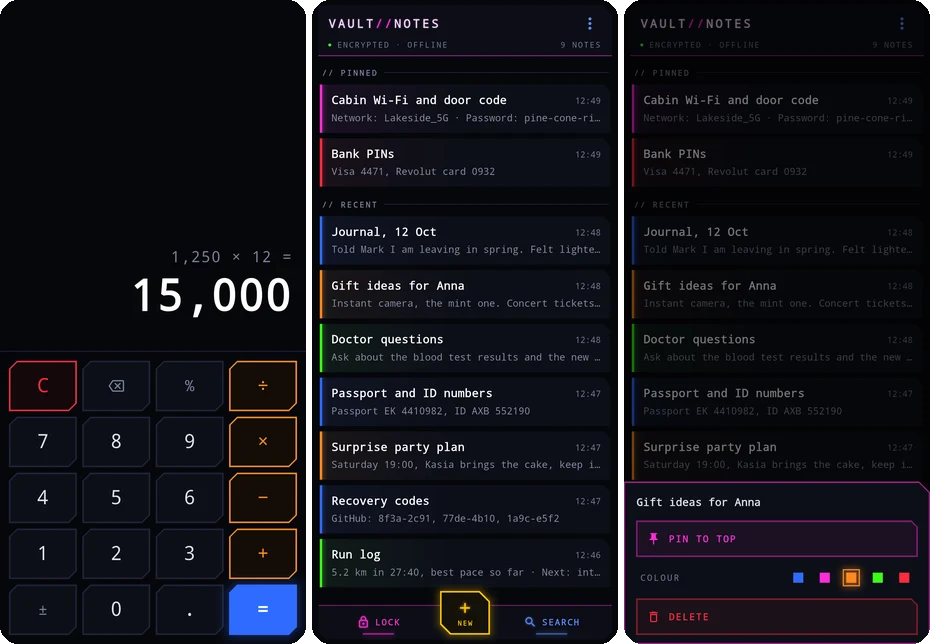
Hidden note apps are a crowded corner of the store. So instead of telling you ours is the best, this post explains what it does with your notes, and gives you three questions to ask any app that promises to keep a secret.
How it works
The first time you open the app, you pick a calculation as your code. Something like 5×17-22=. From then on:
- It is a calculator. Anyone who picks up your phone sees numbers and results. A wrong code is just a sum, and it shows its answer.
- Your code opens the notes. Type it like any other sum. The notes appear.
- Exit, and it is a calculator again. It also locks by itself after a quiet period you choose.
- A second code can wipe everything. You can set a self-destruct sum that deletes every note at once. There is no undo, which is the point.
It works on phones and tablets. There is no lock screen, no hint and no hidden button to give it away.
What happens to your notes
Every note is encrypted on your phone before it is saved. Your code is turned into the key with a method built to make guessing slow and costly, so trying thousands of codes one after another is not a quick job.
Your code is not stored anywhere. Not on the phone, and not with us, because there is no “us” in the picture: no account, no cloud copy, no server. The app works fully offline.
That has one hard side. If you forget your code, the notes are gone. We cannot reset it, because we never had it. Pick a sum you will remember.
Three questions for any app that hides things
These apply to CyberCalc and to every other app in this category. Ask them before you put anything private inside.
1. Can it recover your code? If there is a “forgot code” button that sends you a reset link, someone other than you can open your notes. Maybe only the company. Maybe whoever gets into the company’s systems. A real lock has no spare key.
2. Does it show ads? An ad needs the internet, and the ad network learns a little about the phone it runs on every time. An app built to hide things should not be talking to an ad network while you use it.
3. Does it want an account? A sign-up means your email is now tied to an app whose whole job is to be invisible. That is a strange trade. We wrote more about this in data that is never collected cannot leak.
Our answers: no recovery, no ads, no account, no tracking of any kind.
Free, then one payment
CyberCalc is free with up to 3 notes. One payment, with no subscription, adds unlimited notes, search across your notes and two extra notepad themes. We prefer one payment to a subscription for small apps like this one: you pay once and the app is yours.
Where to get it
Android is out now, on Google Play and on our own F-Droid repository. The iPhone and iPad version is coming. Screenshots and the full feature list are on the CyberCalc app page, or go straight to Google Play.
A calculator is the most boring app on a phone. That is exactly why it makes a good hiding place.